Guide
Configure the Wheelbase
A tour of the Base tab — rotation, FFB strength, damping, the equalizer and the output curve.
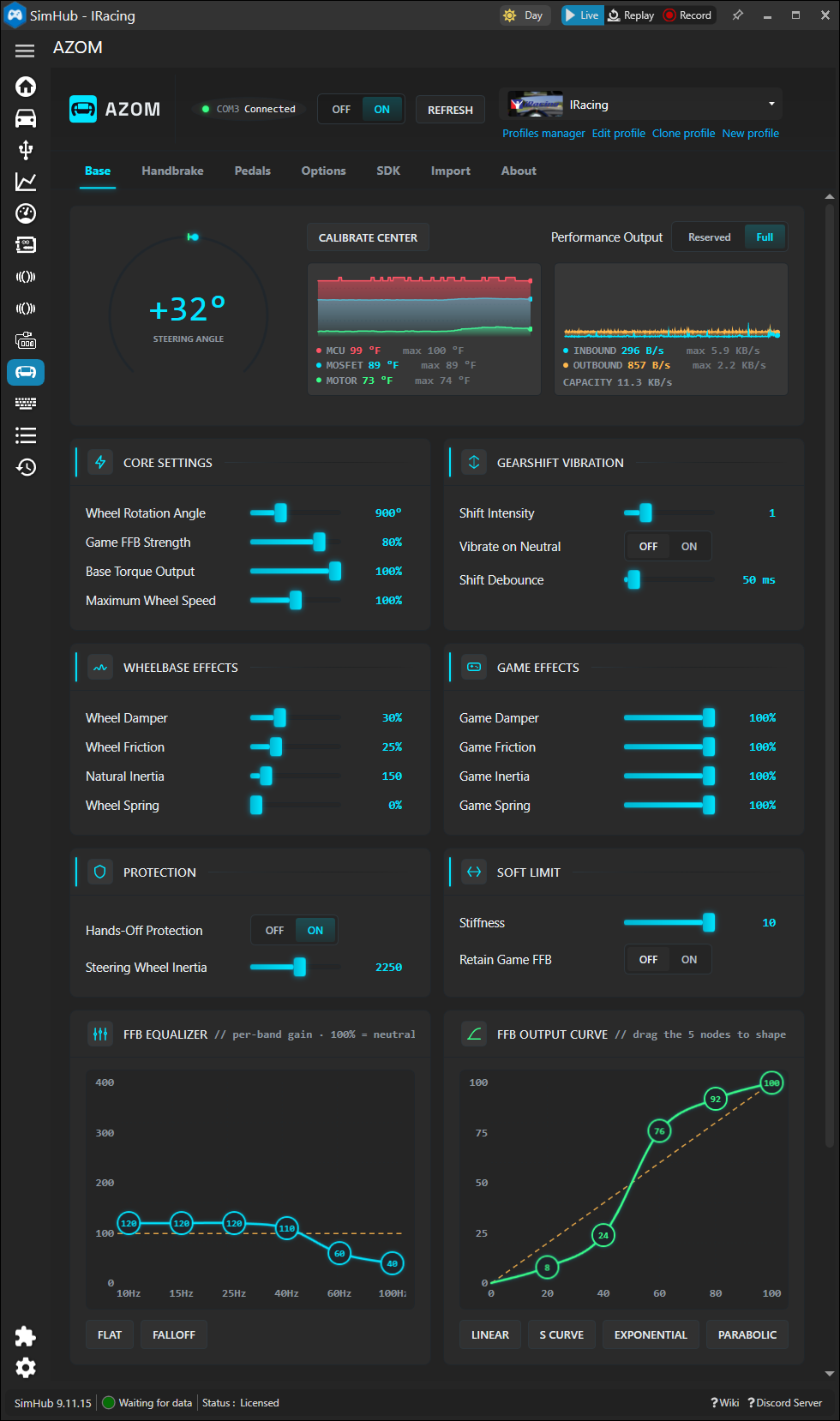
The Base tab is mission control for your wheelbase. Everything Pithouse exposes for force feedback lives here, plus a few extras, and every value is stored per game through SimHub's profile system. Here's what each section does.
Status strip
The top strip is live stats of your wheelbase. The dial shows real-time steering angle; Calibrate Center re-zeros it if your wheel drifts off centre. The two graphs track base health — MCU / MOSFET / motor temperatures and serial inbound / outbound throughput — so you can spot a hot or saturated base at a glance.
Performance Output — Reserved vs Full. Full unlocks the base's complete torque range; Reserved holds some in reserve for longevity and a cooler motor.
Core settings
- Wheel Rotation Angle — total lock-to-lock degrees (e.g. 900°). Match it to the car or let your per-game profile set it.
- Game FFB Strength — overall force scaling. This is the dial most people actually tune; raise it until strong moments just clip, then back off.
- Base Torque Output — hard ceiling on torque the base will ever deliver.
- Maximum Wheel Speed — caps how fast the wheel can spin itself, a safety and feel control.
Gearshift vibration
A bump pulsed through the wheel on every shift. Shift Intensity sets how hard, Shift Debounce stops a fast shift from double-firing, and Vibrate on Neutral toggles the effect when you land in neutral.
Wheelbase effects vs game effects
The left column (Wheel Damper / Friction / Inertia / Spring) is feel the base adds on its own. The right column (Game equivalents) scales those same effects when the game requests them. Keep game effects near 100% so titles feel as intended, and use the wheelbase column to add your own baseline weight.
Protection & soft limit
Hands-Off Protection eases the wheel down safely when you let go, and Steering Wheel Inertia models the physical mass. Soft Limit adds a rising resistance wall as you approach the rotation limit — raise Stiffness for a firmer end stop.
FFB equalizer & output curve
The two graphs at the bottom are the fine-tuning tools:
- FFB Equalizer — per-band gain across the frequency range. 100% is neutral; lift the low bands for more road texture, drop the highs to tame grain. Flat and Falloff are one-click starting points.
- FFB Output Curve — drag the five nodes to reshape how input force maps to output. Linear is faithful; S Curve softens the centre; Exponential and Parabolic trade centre detail for stronger peaks.
Tip: Rather than build this by hand, import a community preset as a baseline and tweak from there — see Import a Profile.