Guide
SDK & iRacing
Enable the MOZA SDK server for iRacing and 360 Hz mode, plus update channels and diagnostics.
Some titles — iRacing in particular — and any game running MOZA's 360 Hz mode need the official MOZA SDK. AZOM ships an embedded SDK server to provide all of the same functions you had before. You'll set this up once.
The SDK tab
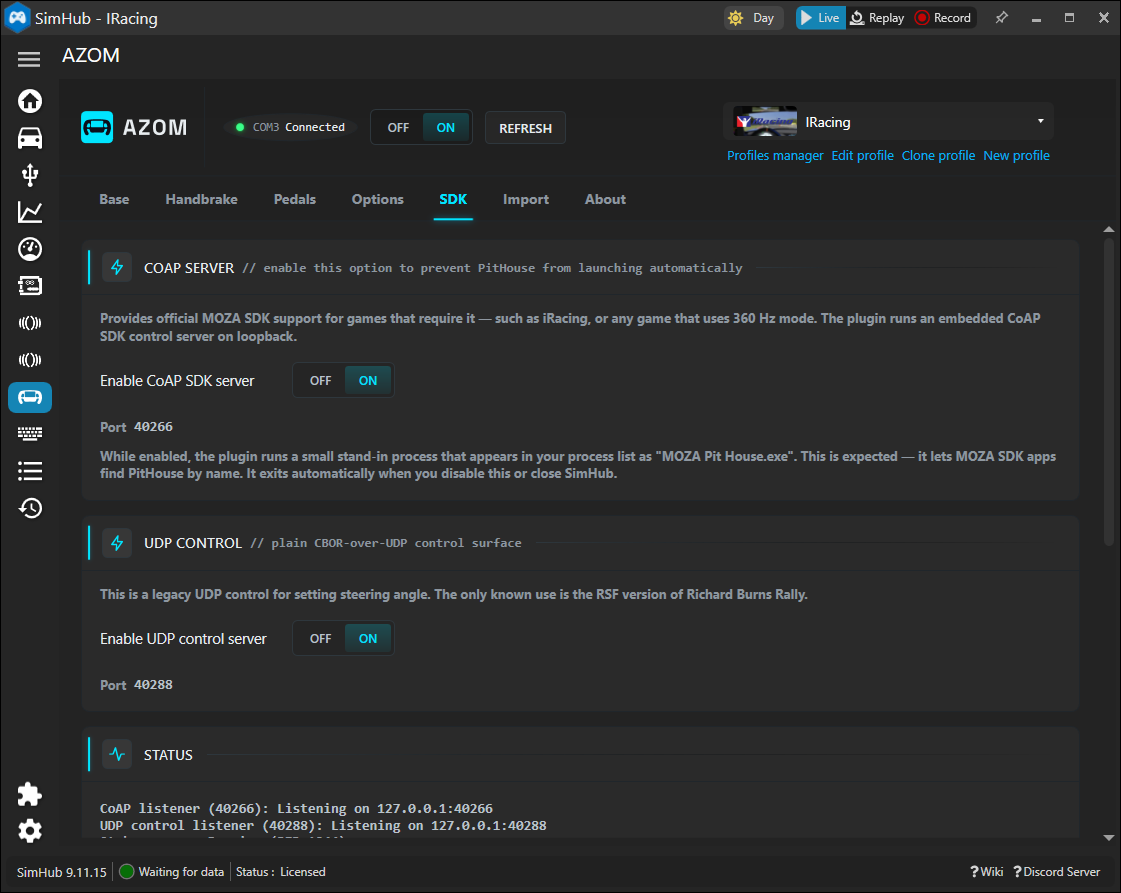
Open the SDK tab in the AZOM panel.
CoAP SDK server
Switch Enable CoAP SDK server on. This runs a small embedded server on loopback that provides official MOZA SDK support for games that require it.
Why a "MOZA Pit House.exe" appears. While the server is enabled, the plugin runs a tiny stand-in process that shows up in your task list as MOZA Pit House.exe. That's expected — it lets MOZA SDK apps find the service by name. It exits automatically when you turn this off or close SimHub. Enabling this option also stops the real application from launching automatically.
UDP control
The UDP control server is a legacy plain-CBOR-over-UDP surface for setting steering angle. The one known use is the RSF build of Richard Burns Rally; leave it off unless you need it.
Status
The Status block confirms the listeners are up — you'll see the CoAP and UDP listeners
reporting that they're bound on 127.0.0.1. If iRacing's force feedback isn't behaving,
this is the first thing to check.